<?xml version="1.0" encoding="utf-8"?> 
<feed xmlns="http://www.w3.org/2005/Atom" xml:lang="en-us">
    <generator uri="https://gohugo.io/" version="0.141.0">Hugo</generator><title type="html"><![CDATA[Mplhep on Blog]]></title>


            <link href="https://blog.scientific-python.org/tags/mplhep/" rel="alternate" type="text/html" title="html" />
            <link href="https://blog.scientific-python.org/tags/mplhep/atom.xml" rel="self" type="application/atom" title="atom" />
    <updated>2026-05-14T22:28:23+00:00</updated>


        <id>https://blog.scientific-python.org/tags/mplhep/</id>
    
        
        <entry>
            <title type="html"><![CDATA[mplhep: matplotlib for particle physics]]></title>
            <link href="https://blog.scientific-python.org/introducing-mplhep/?utm_source=atom_feed" rel="alternate" type="text/html" />
            
                <link href="https://blog.scientific-python.org/matplotlib/pypalettes/?utm_source=atom_feed" rel="related" type="text/html" title="PyPalettes: all the colors you&#39;ll ever need" />
                <link href="https://blog.scientific-python.org/matplotlib/how-to-create-custom-tables/?utm_source=atom_feed" rel="related" type="text/html" title="How to create custom tables" />
                <link href="https://blog.scientific-python.org/matplotlib/unc-biol222/?utm_source=atom_feed" rel="related" type="text/html" title="Art from UNC BIOL222" />
                <link href="https://blog.scientific-python.org/matplotlib/book/?utm_source=atom_feed" rel="related" type="text/html" title="Newly released open access book" />
                <link href="https://blog.scientific-python.org/matplotlib/visualising-usage-using-batteries/?utm_source=atom_feed" rel="related" type="text/html" title="Battery Charts - Visualise usage rates &amp; more" />
            
                <id>https://blog.scientific-python.org/introducing-mplhep/</id>
            
            
            <published>2026-05-14T00:00:00+00:00</published>
            <updated>2026-05-14T00:00:00+00:00</updated>
            
            
            <content type="html"><![CDATA[<blockquote>mplhep is a Scikit-HEP package that turns matplotlib into a comfortable plotting environment for high-energy physics. It plots pre-binned histograms (and helped get plt.stairs into matplotlib), provides ratio/pull comparison panels, and ships the official styles used by ATLAS, CMS, LHCb, ALICE and DUNE.</blockquote><p>In particle or high energy physics (HEP), by the time you draw a plot the data are almost always <em>already binned</em>. A long stretch of the analysis pipeline — <a href="https://uproot.readthedocs.io/">Uproot</a>, <a href="https://coffea-hep.readthedocs.io/">Coffea</a>, <a href="https://boost-histogram.readthedocs.io/">boost-histogram</a>, <a href="https://hist.readthedocs.io/">hist</a> — has reduced terabytes of events into a handful of histograms that you now want to display. That single fact bends what a good plotting API for HEP needs to look like, and it is where <a href="https://github.com/scikit-hep/mplhep">mplhep</a> — a thin, focused matplotlib wrapper in the <a href="https://scikit-hep.org/">Scikit-HEP</a> ecosystem — sits.</p>
<p>This post walks through three things mplhep contributes: a histogram plotting function for pre-binned data, comparison panels (ratio/pull/efficiency) on top of it, and a set of experiment style sheets that match the conventions ATLAS, CMS, LHCb, ALICE and DUNE publications require.</p>
<h2 id="plotting-pre-binned-histograms">Plotting pre-binned histograms<a class="headerlink" href="#plotting-pre-binned-histograms" title="Link to this heading">#</a></h2>
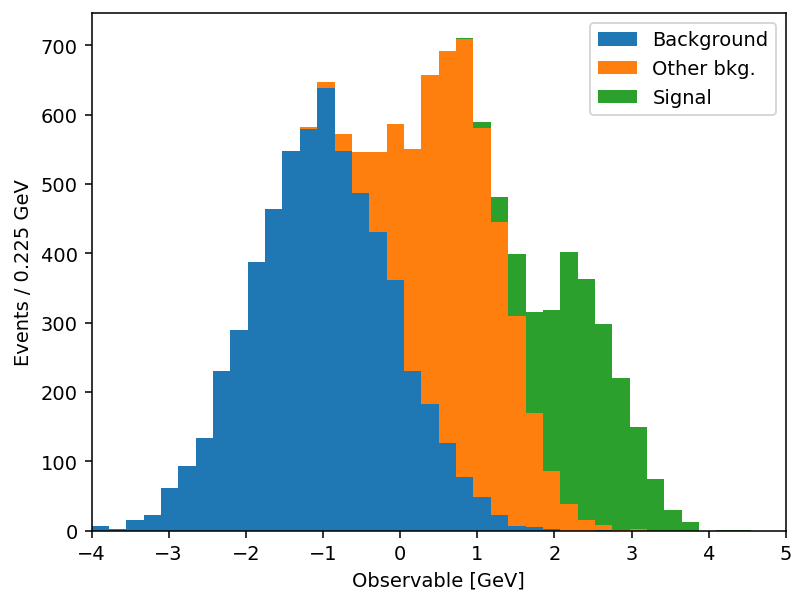
<p>If you want to plot a histogram matplotlib had a great function for it - <code>plt.hist</code>, except in its convenience it not only serves the plotting, but also wraps the histogramming - <code>(counts, edges)</code> from <code>np.histogram</code>. But if the histogram you want to visualize is already <em>made</em> you used to have to either &ldquo;hack&rdquo; <code>plt.hist</code> by filling 1&rsquo;s and passing histogram values as weights, or use <code>plt.step</code> and hack your <code>len(x) = len(y) + 1</code> input information into the same length or accept <code>plt.bar</code> with its own limitations.</p>
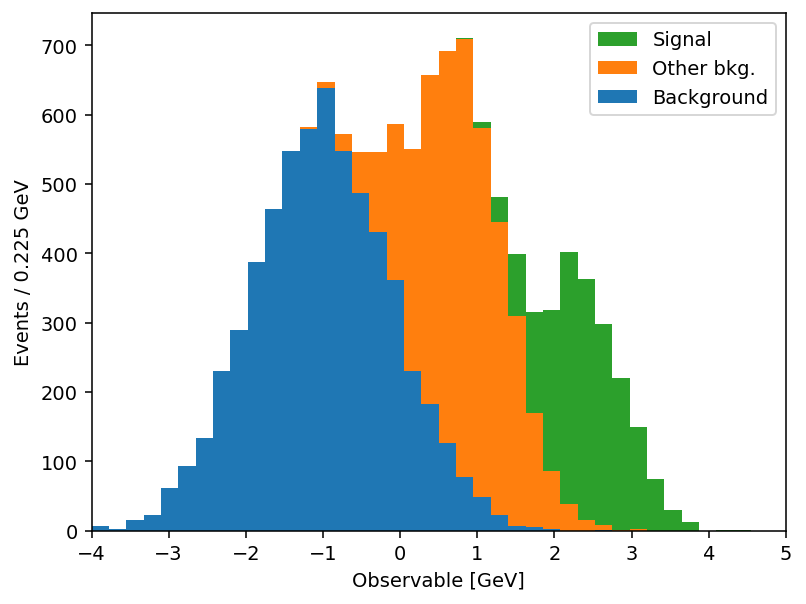
<p>To improve this particular user experience the <code>mplhep</code> authors contributed a new distinct primitive <a href="https://matplotlib.org/stable/api/_as_gen/matplotlib.pyplot.stairs.html"><code>plt.stairs</code></a>, which was added in matplotlib 3.4 specifically for pre-binned data. This simplifies the syntax for HEP users significantly, but at the same time <code>plt.stairs</code> is still just a primitive function compared to the rich functionality of <code>plt.hist</code>. To mimic and indeed extend this functionality for the needs of particle physicists and indeed anyone who handles pre-binned histograms, we present the <code>mplhep</code> (imported as <code>mh</code>) library with <a href="https://scikit-hep.org/mplhep/latest/guide_basic_plotting/"><code>mh.histplot</code></a> at its core (see also the full <a href="https://scikit-hep.org/mplhep/latest/">docs</a>).</p>
<div style="display: grid; grid-template-columns: 1fr 1fr; column-gap: 1.5rem; row-gap: 0.5rem; margin: 1.5rem 0; align-items: start;">
<div>
<p><strong><code>plt.stairs</code> (matplotlib primitive)</strong></p>
</div>
<div>
<p><strong><code>mh.histplot</code> (mplhep wrapper)</strong></p>
</div>
<div>


<div class="highlight">
  <pre class="chroma"><code><span class="line"><span class="cl"><span class="kn">import</span> <span class="nn">matplotlib.pyplot</span> <span class="k">as</span> <span class="nn">plt</span>
</span></span><span class="line"><span class="cl"><span class="kn">import</span> <span class="nn">numpy</span> <span class="k">as</span> <span class="nn">np</span>
</span></span><span class="line"><span class="cl">
</span></span><span class="line"><span class="cl"><span class="n">cumulative</span> <span class="o">=</span> <span class="n">np</span><span class="o">.</span><span class="n">zeros_like</span><span class="p">(</span><span class="n">ha</span><span class="p">,</span> <span class="n">dtype</span><span class="o">=</span><span class="nb">float</span><span class="p">)</span>
</span></span><span class="line"><span class="cl"><span class="k">for</span> <span class="n">cnt</span><span class="p">,</span> <span class="n">lab</span> <span class="ow">in</span> <span class="nb">zip</span><span class="p">([</span><span class="n">ha</span><span class="p">,</span> <span class="n">hb</span><span class="p">,</span> <span class="n">hc</span><span class="p">],</span> <span class="n">labels</span><span class="p">):</span>
</span></span><span class="line"><span class="cl">    <span class="n">new</span> <span class="o">=</span> <span class="n">cumulative</span> <span class="o">+</span> <span class="n">cnt</span>
</span></span><span class="line"><span class="cl">    <span class="n">plt</span><span class="o">.</span><span class="n">stairs</span><span class="p">(</span><span class="n">new</span><span class="p">,</span> <span class="n">edges</span><span class="p">,</span> <span class="n">baseline</span><span class="o">=</span><span class="n">cumulative</span><span class="p">,</span> <span class="n">fill</span><span class="o">=</span><span class="kc">True</span><span class="p">,</span> <span class="n">label</span><span class="o">=</span><span class="n">lab</span><span class="p">)</span>
</span></span><span class="line"><span class="cl">    <span class="n">cumulative</span> <span class="o">=</span> <span class="n">new</span>
</span></span><span class="line"><span class="cl"><span class="n">plt</span><span class="o">.</span><span class="n">legend</span><span class="p">()</span></span></span></code></pre>
</div>
</div>
<div>


<div class="highlight">
  <pre class="chroma"><code><span class="line"><span class="cl"><span class="kn">import</span> <span class="nn">matplotlib.pyplot</span> <span class="k">as</span> <span class="nn">plt</span>
</span></span><span class="line"><span class="cl"><span class="kn">import</span> <span class="nn">mplhep</span> <span class="k">as</span> <span class="nn">mh</span>
</span></span><span class="line"><span class="cl">
</span></span><span class="line"><span class="cl"><span class="n">mh</span><span class="o">.</span><span class="n">histplot</span><span class="p">(</span>
</span></span><span class="line"><span class="cl">    <span class="p">[</span><span class="n">ha</span><span class="p">,</span> <span class="n">hb</span><span class="p">,</span> <span class="n">hc</span><span class="p">],</span>
</span></span><span class="line"><span class="cl">    <span class="n">edges</span><span class="p">,</span>
</span></span><span class="line"><span class="cl">    <span class="n">stack</span><span class="o">=</span><span class="kc">True</span><span class="p">,</span>
</span></span><span class="line"><span class="cl">    <span class="n">histtype</span><span class="o">=</span><span class="s2">&#34;fill&#34;</span><span class="p">,</span>
</span></span><span class="line"><span class="cl">    <span class="n">label</span><span class="o">=</span><span class="n">labels</span><span class="p">,</span>
</span></span><span class="line"><span class="cl"><span class="p">)</span>
</span></span><span class="line"><span class="cl"><span class="n">plt</span><span class="o">.</span><span class="n">legend</span><span class="p">()</span></span></span></code></pre>
</div>
</div>
<div>
<p><img src="/introducing-mplhep/api-stairs.png" alt="Stacked histogram drawn by calling plt.stairs three times, accumulating a baseline manually so each component sits on top of the previous one."></p>
</div>
<div>
<p><img src="/introducing-mplhep/api-histplot.png" alt="The same stacked histogram produced by a single mh.histplot call with stack=True; identical output, much less ceremony."></p>
</div>
</div>
<p>Same output, half the code. And the savings compound once you actually use the keyword arguments. <code>mh.histplot</code> accepts a NumPy tuple, a <code>hist.Hist</code>, a <code>boost_histogram.Histogram</code>, or any object implementing the <a href="https://uhi.readthedocs.io/">PlottableProtocol</a>, so the same call works regardless of what your analysis framework hands you. From there, the keywords most analyses lean on:</p>
<ul>
<li><code>yerr=True</code> → Poisson intervals for integer counts; pass a 1D array for symmetric errors, a 2D <code>(2, N)</code> array for asymmetric ones, or <code>yerr=False</code> to suppress them entirely.</li>
<li><code>w2=variances</code> → sum-of-weights-squared propagation for weighted MC. When combined with <code>yerr=True</code>, mplhep picks Poisson intervals for integer-like <code>w2</code> and <code>sqrt(w2)</code> otherwise; <code>w2method=</code> lets you force one or the other.</li>
<li><code>sort=&quot;yield&quot;</code> → auto-sort a stack by total yield (largest at the bottom); <code>&quot;label&quot;</code> sorts alphabetically; append <code>_r</code> to reverse.</li>
<li><code>histtype=</code> → <code>&quot;step&quot;</code>, <code>&quot;fill&quot;</code>, <code>&quot;errorbar&quot;</code>, <code>&quot;bar&quot;</code>, <code>&quot;barstep&quot;</code>, or <code>&quot;band&quot;</code> (which spans the <code>yerr</code> range — perfect for systematic uncertainty bands without a second call).</li>
<li><code>density=True</code> / <code>binwnorm=1.0</code> → normalise to unit area or per unit bin width.</li>
<li><code>flow=&quot;show&quot;</code> / <code>&quot;sum&quot;</code> / <code>&quot;hint&quot;</code> → handle under- and overflow bins explicitly.</li>
<li><code>blind=(lo, hi)</code> (or <code>mh.loc[lo:hi]</code>) → hide bins in a signal region for blind analyses.</li>
</ul>
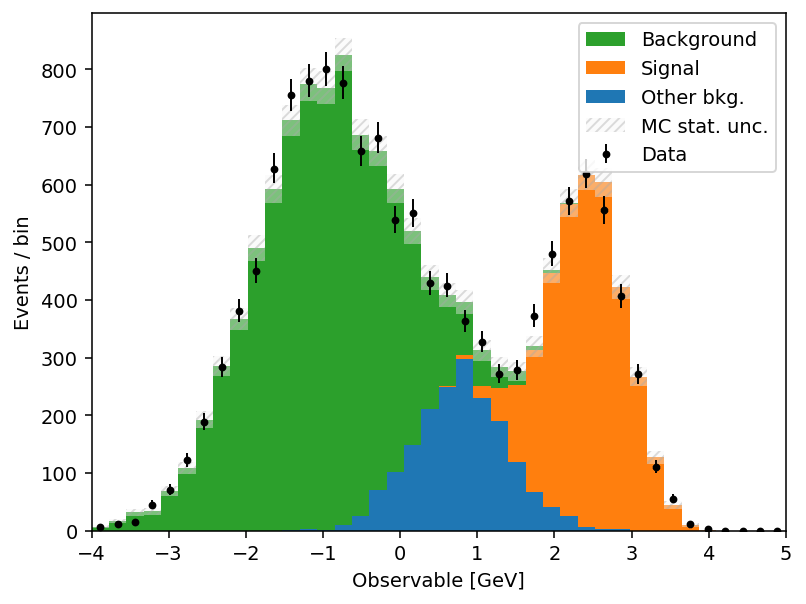
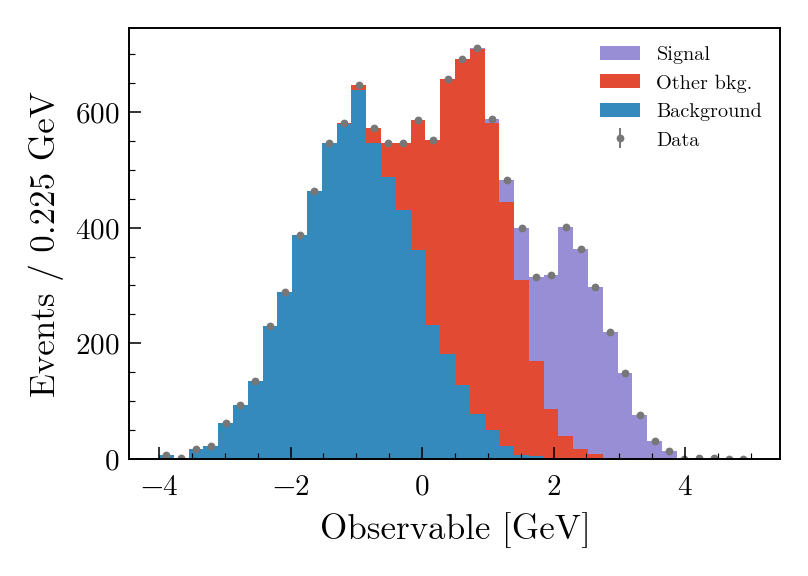
<p>The full list is in the <a href="https://scikit-hep.org/mplhep/latest/api/#mplhep.histplot"><code>mh.histplot</code> API reference</a>. A short example that exercises several of these — sum-of-weights-squared on a weighted MC stack, auto-sorting by yield, a hatched MC uncertainty band, and Poisson-interval errors on the data overlay:</p>


<div class="highlight">
  <pre class="chroma"><code><span class="line"><span class="cl"><span class="n">mh</span><span class="o">.</span><span class="n">histplot</span><span class="p">(</span>
</span></span><span class="line"><span class="cl">    <span class="n">mc_components</span><span class="p">,</span>
</span></span><span class="line"><span class="cl">    <span class="n">edges</span><span class="p">,</span>
</span></span><span class="line"><span class="cl">    <span class="n">w2</span><span class="o">=</span><span class="n">mc_variances</span><span class="p">,</span>  <span class="c1"># propagate Sumw2 for weighted MC</span>
</span></span><span class="line"><span class="cl">    <span class="n">stack</span><span class="o">=</span><span class="kc">True</span><span class="p">,</span>
</span></span><span class="line"><span class="cl">    <span class="n">sort</span><span class="o">=</span><span class="s2">&#34;yield&#34;</span><span class="p">,</span>  <span class="c1"># smallest yield on top of the stack</span>
</span></span><span class="line"><span class="cl">    <span class="n">histtype</span><span class="o">=</span><span class="s2">&#34;fill&#34;</span><span class="p">,</span>
</span></span><span class="line"><span class="cl">    <span class="n">label</span><span class="o">=</span><span class="p">[</span><span class="s2">&#34;Background&#34;</span><span class="p">,</span> <span class="s2">&#34;Other bkg.&#34;</span><span class="p">,</span> <span class="s2">&#34;Signal&#34;</span><span class="p">],</span>
</span></span><span class="line"><span class="cl"><span class="p">)</span>
</span></span><span class="line"><span class="cl"><span class="n">mh</span><span class="o">.</span><span class="n">histplot</span><span class="p">(</span>
</span></span><span class="line"><span class="cl">    <span class="n">mc_total</span><span class="p">,</span>
</span></span><span class="line"><span class="cl">    <span class="n">edges</span><span class="p">,</span>
</span></span><span class="line"><span class="cl">    <span class="n">yerr</span><span class="o">=</span><span class="n">np</span><span class="o">.</span><span class="n">sqrt</span><span class="p">(</span><span class="n">mc_total_var</span><span class="p">),</span>
</span></span><span class="line"><span class="cl">    <span class="n">histtype</span><span class="o">=</span><span class="s2">&#34;band&#34;</span><span class="p">,</span>  <span class="c1"># filled band spanning ±yerr</span>
</span></span><span class="line"><span class="cl">    <span class="n">label</span><span class="o">=</span><span class="s2">&#34;MC stat. unc.&#34;</span><span class="p">,</span>
</span></span><span class="line"><span class="cl">    <span class="n">color</span><span class="o">=</span><span class="s2">&#34;gray&#34;</span><span class="p">,</span>
</span></span><span class="line"><span class="cl">    <span class="n">alpha</span><span class="o">=</span><span class="mf">0.4</span><span class="p">,</span>
</span></span><span class="line"><span class="cl"><span class="p">)</span>
</span></span><span class="line"><span class="cl"><span class="n">mh</span><span class="o">.</span><span class="n">histplot</span><span class="p">(</span>
</span></span><span class="line"><span class="cl">    <span class="n">data_counts</span><span class="p">,</span>
</span></span><span class="line"><span class="cl">    <span class="n">edges</span><span class="p">,</span>
</span></span><span class="line"><span class="cl">    <span class="n">yerr</span><span class="o">=</span><span class="kc">True</span><span class="p">,</span>  <span class="c1"># Poisson intervals for integer counts</span>
</span></span><span class="line"><span class="cl">    <span class="n">histtype</span><span class="o">=</span><span class="s2">&#34;errorbar&#34;</span><span class="p">,</span>
</span></span><span class="line"><span class="cl">    <span class="n">color</span><span class="o">=</span><span class="s2">&#34;black&#34;</span><span class="p">,</span>
</span></span><span class="line"><span class="cl">    <span class="n">label</span><span class="o">=</span><span class="s2">&#34;Data&#34;</span><span class="p">,</span>
</span></span><span class="line"><span class="cl"><span class="p">)</span></span></span></code></pre>
</div>
<div style="max-width: 60%; margin: 1.5rem auto;">
<p><img src="/introducing-mplhep/kwargs-sugar.png" alt="Stacked weighted MC with three components auto-sorted by yield, a hatched MC statistical uncertainty band spanning the model total, and data points with Poisson-interval error bars. The full figure is composed by three independent mh.histplot calls onto the same axes."></p>
</div>
<h2 id="stacks-and-comparison-panels">Stacks and comparison panels<a class="headerlink" href="#stacks-and-comparison-panels" title="Link to this heading">#</a></h2>
<p>A HEP plot rarely stops at a single histogram. The canonical figure has a stacked background model, an unstacked signal or systematic-uncertainty band, data points with errors on top, and a thinner <em>comparison</em> panel underneath: a ratio, a pull, an efficiency. Those panels all share a layout — twinned bins, reference line at 1 or 0 — and they&rsquo;re surprisingly tedious to assemble in matplotlib.</p>
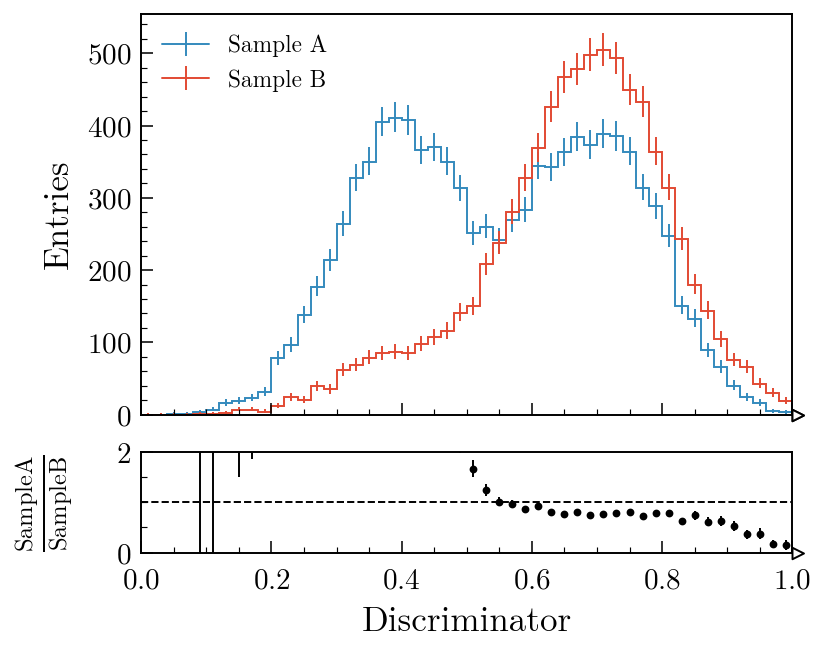
<p><code>mh.comp.hists</code> builds one in a single call for the two-histogram case; <code>mh.comp.data_model</code> handles the full data-versus-model figure with stacked and unstacked components, MC statistical uncertainty band, and any of the same comparison types in the lower panel:</p>
<div style="display: grid; grid-template-columns: 1fr 1fr; column-gap: 1.5rem; row-gap: 0.5rem; margin: 1.5rem 0; align-items: start;">
<div>
<p><strong>Two histograms with a ratio panel</strong></p>
</div>
<div>
<p><strong>Data vs model with a pull panel</strong></p>
</div>
<div>


<div class="highlight">
  <pre class="chroma"><code><span class="line"><span class="cl"><span class="n">fig</span><span class="p">,</span> <span class="n">ax_main</span><span class="p">,</span> <span class="n">ax_comp</span> <span class="o">=</span> <span class="n">mh</span><span class="o">.</span><span class="n">comp</span><span class="o">.</span><span class="n">hists</span><span class="p">(</span>
</span></span><span class="line"><span class="cl">    <span class="n">h1</span><span class="p">,</span>
</span></span><span class="line"><span class="cl">    <span class="n">h2</span><span class="p">,</span>
</span></span><span class="line"><span class="cl">    <span class="n">xlabel</span><span class="o">=</span><span class="s2">&#34;Discriminator&#34;</span><span class="p">,</span>
</span></span><span class="line"><span class="cl">    <span class="n">h1_label</span><span class="o">=</span><span class="s2">&#34;Sample A&#34;</span><span class="p">,</span>
</span></span><span class="line"><span class="cl">    <span class="n">h2_label</span><span class="o">=</span><span class="s2">&#34;Sample B&#34;</span><span class="p">,</span>
</span></span><span class="line"><span class="cl">    <span class="n">comparison</span><span class="o">=</span><span class="s2">&#34;ratio&#34;</span><span class="p">,</span>
</span></span><span class="line"><span class="cl"><span class="p">)</span></span></span></code></pre>
</div>
</div>
<div>


<div class="highlight">
  <pre class="chroma"><code><span class="line"><span class="cl"><span class="n">fig</span><span class="p">,</span> <span class="n">ax_main</span><span class="p">,</span> <span class="n">ax_comp</span> <span class="o">=</span> <span class="n">mh</span><span class="o">.</span><span class="n">comp</span><span class="o">.</span><span class="n">data_model</span><span class="p">(</span>
</span></span><span class="line"><span class="cl">    <span class="n">data_hist</span><span class="o">=</span><span class="n">data</span><span class="p">,</span>
</span></span><span class="line"><span class="cl">    <span class="n">stacked_components</span><span class="o">=</span><span class="p">[</span><span class="n">bkg_a</span><span class="p">,</span> <span class="n">bkg_b</span><span class="p">],</span>
</span></span><span class="line"><span class="cl">    <span class="n">stacked_labels</span><span class="o">=</span><span class="p">[</span><span class="s2">&#34;Bkg 1&#34;</span><span class="p">,</span> <span class="s2">&#34;Bkg 2&#34;</span><span class="p">],</span>
</span></span><span class="line"><span class="cl">    <span class="n">unstacked_components</span><span class="o">=</span><span class="p">[</span><span class="n">signal</span><span class="p">],</span>
</span></span><span class="line"><span class="cl">    <span class="n">unstacked_labels</span><span class="o">=</span><span class="p">[</span><span class="s2">&#34;Signal&#34;</span><span class="p">],</span>
</span></span><span class="line"><span class="cl">    <span class="n">comparison</span><span class="o">=</span><span class="s2">&#34;pull&#34;</span><span class="p">,</span>
</span></span><span class="line"><span class="cl"><span class="p">)</span></span></span></code></pre>
</div>
</div>
<div>
<p><img src="/introducing-mplhep/ratio.png" alt="Two histograms overlaid in the main panel with their ratio in a thin lower panel; the ratio drops sharply where Sample As spectrum extends past Sample Bs."></p>
</div>
<div>
<p><img src="/introducing-mplhep/data-model.png" alt="A stacked background model with an unstacked signal component overlaid, data points with error bars and an MC statistical uncertainty band, and a pull panel below showing per-bin (data minus MC) divided by combined uncertainty."></p>
</div>
</div>
<p><code>comparison=</code> also accepts <code>&quot;difference&quot;</code>, <code>&quot;relative_difference&quot;</code>, <code>&quot;asymmetry&quot;</code> and <code>&quot;efficiency&quot;</code>; the MC statistical uncertainty is propagated through all of them. Swapping <code>&quot;pull&quot;</code> for <code>&quot;ratio&quot;</code> in the second example swaps the lower panel out with no other code changes. The <a href="https://scikit-hep.org/mplhep/latest/guide_comparisons/">comparisons guide</a> covers every variant with worked examples; the <a href="https://scikit-hep.org/mplhep/latest/gallery/">gallery</a> is the fastest way to find a plot that looks like the one you&rsquo;re trying to make.</p>
<h2 id="experiment-styles">Experiment styles<a class="headerlink" href="#experiment-styles" title="Link to this heading">#</a></h2>
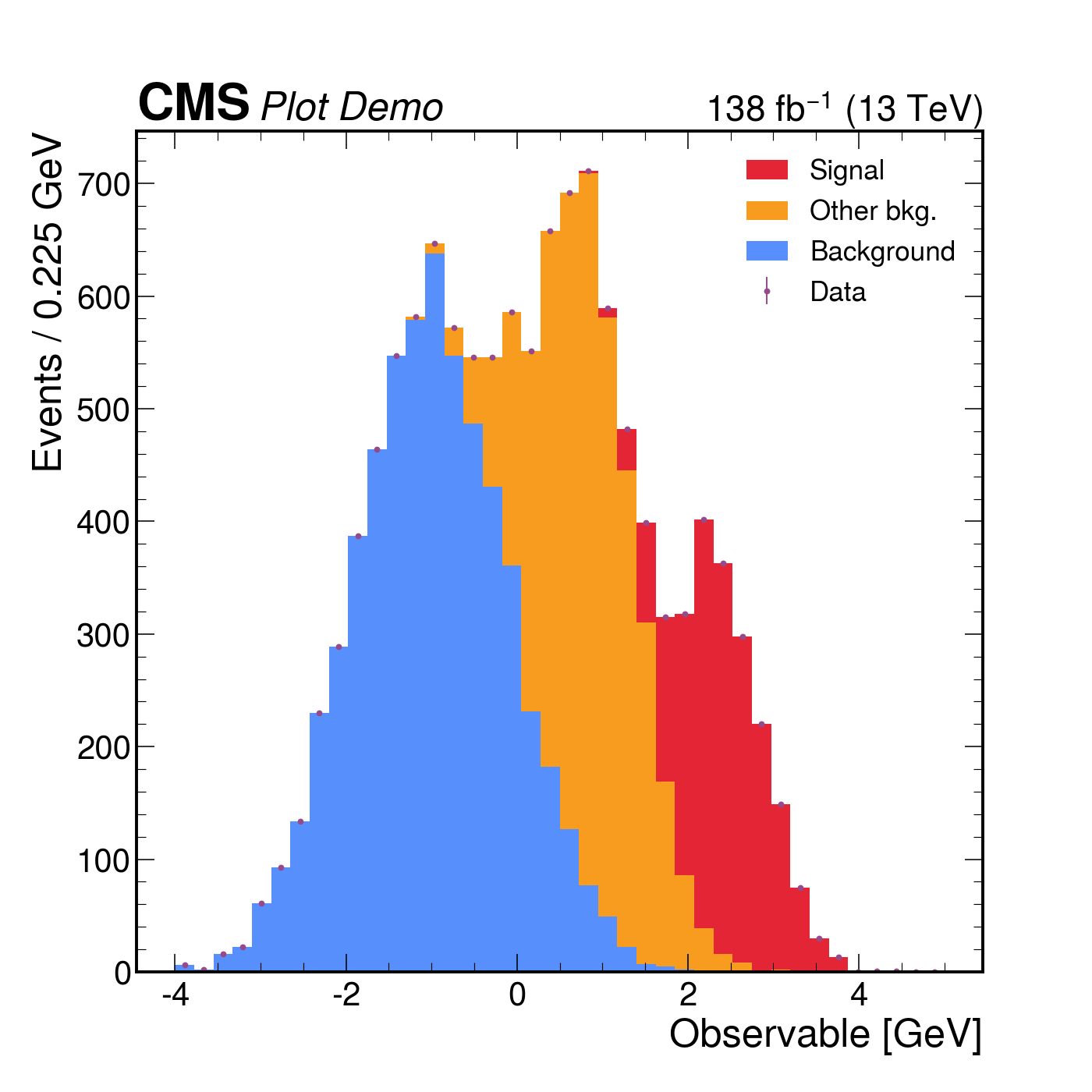
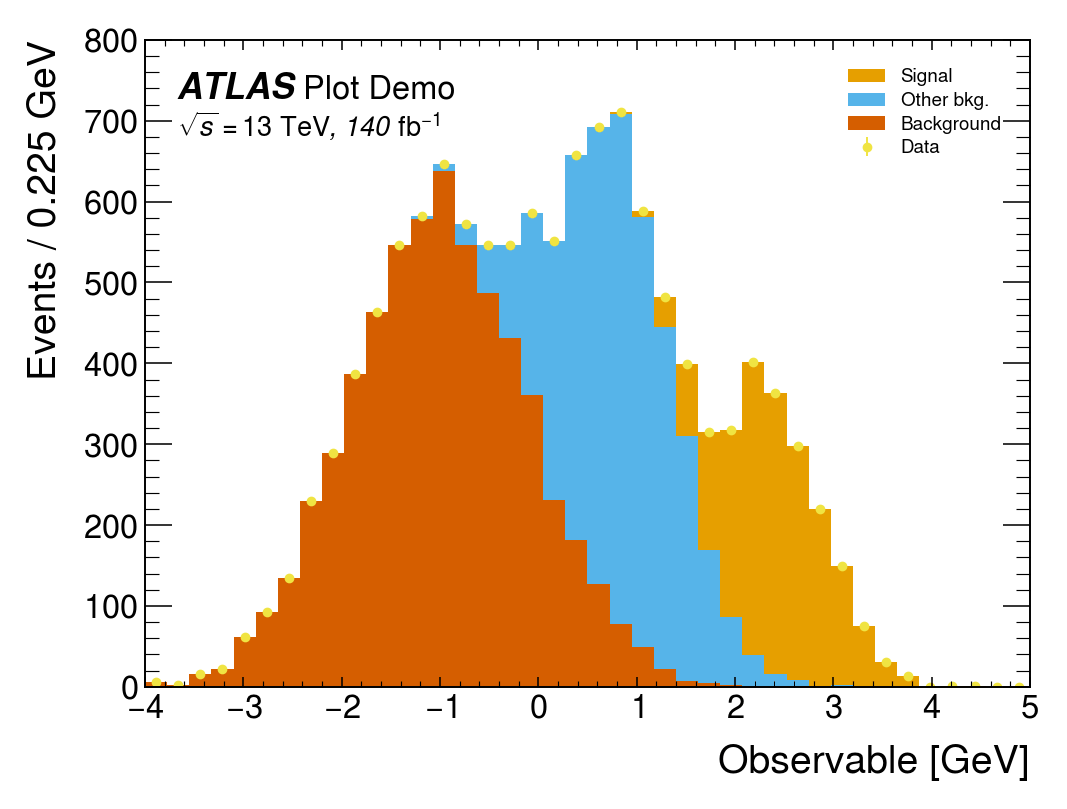
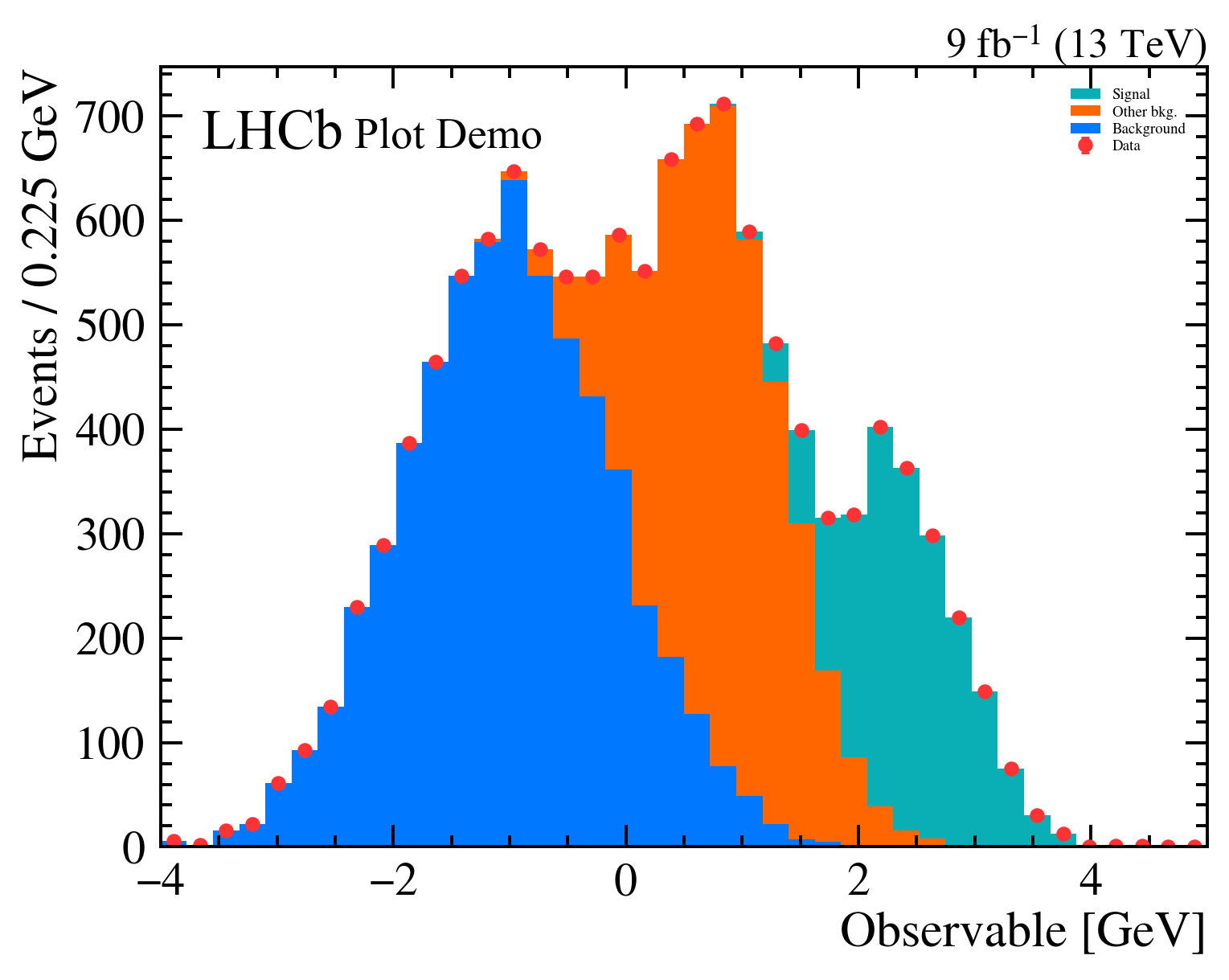
<p>The third thing mplhep does is take care of the typography. Every collaboration has a house style — a font, a &ldquo;CMS&rdquo; / &ldquo;ATLAS&rdquo; / &ldquo;LHCb&rdquo; label with a status qualifier, a √s and integrated-luminosity string, specific tick directions and minor-tick behaviour, a colour cycle. <code>mh.style.use(&quot;CMS&quot;)</code> (or <code>&quot;ATLAS&quot;</code>, <code>&quot;LHCb2&quot;</code>, <code>&quot;ALICE&quot;</code>, <code>&quot;DUNE&quot;</code>) sets matplotlib&rsquo;s <code>rcParams</code> accordingly and bundles the open fonts (TeX Gyre Heroes as a Helvetica stand-in, Fira Sans, etc.) so the result is reproducible across operating systems. The collaboration tag is placed by a matching helper — <code>mh.cms.label</code>, <code>mh.atlas.label</code>, <code>mh.lhcb.label</code>, <code>mh.alice.label</code>, <code>mh.dune.label</code> — which knows where each one is meant to live (CMS above the axes in the figure margin; ATLAS, LHCb and ALICE <em>inside</em> the axes at top-left). For figures heading somewhere that doesn&rsquo;t fit a single collaboration&rsquo;s house style, <code>mh.style.use(&quot;plothist&quot;)</code> provides a neutral serif look with the same comparison-panel ergonomics and no experiment tag. The <a href="https://scikit-hep.org/mplhep/latest/guide_styling/">styling guide</a> catalogues every available style and the exact arguments each <code>.label()</code> helper accepts.</p>


<div class="highlight">
  <pre class="chroma"><code><span class="line"><span class="cl"><span class="k">with</span> <span class="n">plt</span><span class="o">.</span><span class="n">style</span><span class="o">.</span><span class="n">context</span><span class="p">(</span><span class="n">mh</span><span class="o">.</span><span class="n">style</span><span class="o">.</span><span class="n">CMS</span><span class="p">):</span>
</span></span><span class="line"><span class="cl">    <span class="n">fig</span><span class="p">,</span> <span class="n">ax</span> <span class="o">=</span> <span class="n">plt</span><span class="o">.</span><span class="n">subplots</span><span class="p">()</span>
</span></span><span class="line"><span class="cl">    <span class="n">mh</span><span class="o">.</span><span class="n">histplot</span><span class="p">(</span>
</span></span><span class="line"><span class="cl">        <span class="p">[</span><span class="n">ha</span><span class="p">,</span> <span class="n">hb</span><span class="p">,</span> <span class="n">hc</span><span class="p">],</span>
</span></span><span class="line"><span class="cl">        <span class="n">edges</span><span class="p">,</span>
</span></span><span class="line"><span class="cl">        <span class="n">stack</span><span class="o">=</span><span class="kc">True</span><span class="p">,</span>
</span></span><span class="line"><span class="cl">        <span class="n">histtype</span><span class="o">=</span><span class="s2">&#34;fill&#34;</span><span class="p">,</span>
</span></span><span class="line"><span class="cl">        <span class="n">label</span><span class="o">=</span><span class="p">[</span><span class="s2">&#34;Background&#34;</span><span class="p">,</span> <span class="s2">&#34;Other bkg.&#34;</span><span class="p">,</span> <span class="s2">&#34;Signal&#34;</span><span class="p">],</span>
</span></span><span class="line"><span class="cl">        <span class="n">ax</span><span class="o">=</span><span class="n">ax</span><span class="p">,</span>
</span></span><span class="line"><span class="cl">    <span class="p">)</span>
</span></span><span class="line"><span class="cl">    <span class="n">mh</span><span class="o">.</span><span class="n">histplot</span><span class="p">(</span>
</span></span><span class="line"><span class="cl">        <span class="n">ha</span> <span class="o">+</span> <span class="n">hb</span> <span class="o">+</span> <span class="n">hc</span><span class="p">,</span> <span class="n">edges</span><span class="p">,</span> <span class="n">histtype</span><span class="o">=</span><span class="s2">&#34;errorbar&#34;</span><span class="p">,</span> <span class="n">color</span><span class="o">=</span><span class="s2">&#34;black&#34;</span><span class="p">,</span> <span class="n">label</span><span class="o">=</span><span class="s2">&#34;Data&#34;</span><span class="p">,</span> <span class="n">ax</span><span class="o">=</span><span class="n">ax</span>
</span></span><span class="line"><span class="cl">    <span class="p">)</span>
</span></span><span class="line"><span class="cl">    <span class="n">mh</span><span class="o">.</span><span class="n">cms</span><span class="o">.</span><span class="n">label</span><span class="p">(</span><span class="s2">&#34;Plot Demo&#34;</span><span class="p">,</span> <span class="n">data</span><span class="o">=</span><span class="kc">True</span><span class="p">,</span> <span class="n">lumi</span><span class="o">=</span><span class="mi">138</span><span class="p">,</span> <span class="n">com</span><span class="o">=</span><span class="mi">13</span><span class="p">,</span> <span class="n">ax</span><span class="o">=</span><span class="n">ax</span><span class="p">)</span>
</span></span><span class="line"><span class="cl">    <span class="n">mh</span><span class="o">.</span><span class="n">mpl_magic</span><span class="p">(</span><span class="n">ax</span><span class="o">=</span><span class="n">ax</span><span class="p">)</span></span></span></code></pre>
</div>
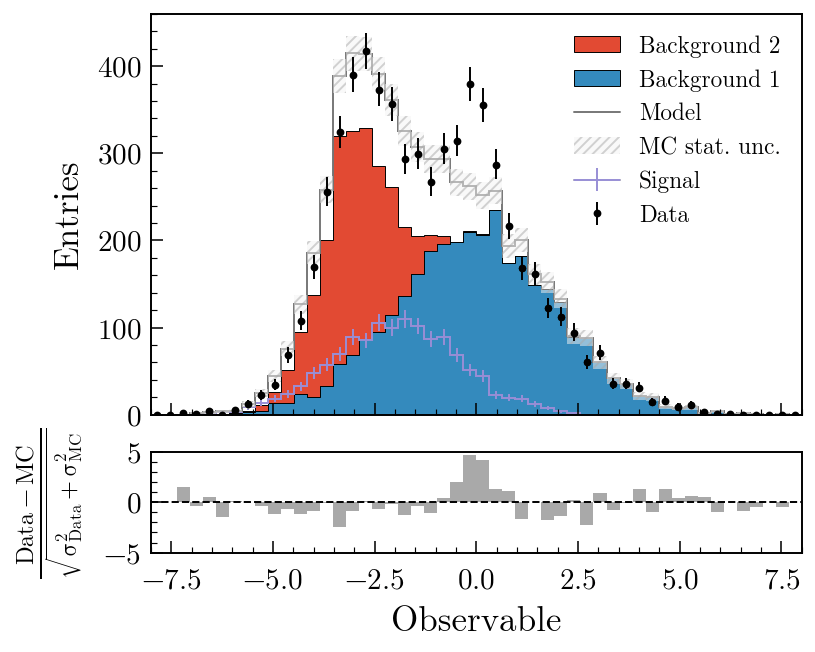
<p>The same three-component stack with data points rendered four ways. Each style picks its own colour cycle, font, and label conventions; <a href="https://scikit-hep.org/mplhep/latest/guide_utilities/"><code>mh.mpl_magic</code></a> auto-grows the y-axis so the experiment tag, legend and data don&rsquo;t fight for the same space, and is one of a small set of layout helpers (<code>yscale_legend</code>, <code>yscale_anchored_text</code>, <code>sort_legend</code>, <code>append_axes</code>, …) that the <a href="https://scikit-hep.org/mplhep/latest/guide_utilities/">utilities guide</a> covers in full.</p>
<div style="display: grid; grid-template-columns: repeat(4, 1fr); gap: 0.75rem; margin: 1.5rem 0; align-items: start;">
<div>
<p><img src="/introducing-mplhep/style-cms.png" alt="CMS style: bold CMS Plot Demo in the figure margin, 138 fb⁻¹ (13 TeV) right-justified; CMS colour cycle."></p>
</div>
<div>
<p><img src="/introducing-mplhep/style-atlas.png" alt="ATLAS style: italic ATLAS Plot Demo inside top-left, √s = 13 TeV, 140 fb⁻¹ on a second line; ATLAS colour cycle."></p>
</div>
<div>
<p><img src="/introducing-mplhep/style-lhcb2.png" alt="LHCb style: bold LHCb Plot Demo inside the axes top-left; 9 fb⁻¹ (13 TeV) in the margin above; LHCb colour cycle."></p>
</div>
<div>
<p><img src="/introducing-mplhep/style-plothist.png" alt="plothist style: no experiment label, serif typography, neutral colour palette. The same stacked-histogram-with-data plot rendered in mplheps non-experiment style."></p>
</div>
</div>
<p>The same data, the same single <code>mh.histplot</code> call — only the active style context changes.</p>
<h2 id="where-it-fits">Where it fits<a class="headerlink" href="#where-it-fits" title="Link to this heading">#</a></h2>
<p>mplhep is part of <a href="https://scikit-hep.org/">Scikit-HEP</a>, a collection of pure-Python tools for particle physics that also includes <a href="https://hist.readthedocs.io/">hist</a>, <a href="https://uproot.readthedocs.io/">Uproot</a>, <a href="https://awkward-array.org/">Awkward Array</a>, <a href="https://vector.readthedocs.io/">vector</a> and <a href="https://pyhf.readthedocs.io/">pyhf</a>, among many others. It deliberately stays a thin layer on top of plain matplotlib rather than replacing it — every figure mplhep produces is a regular <code>Figure</code>/<code>Axes</code> pair you can keep customising with the matplotlib API you already know. The point is to remove the friction of the conventions, not the flexibility underneath them.</p>
<p>If you work in HEP, <code>pip install mplhep</code> followed by <code>mh.style.use(...)</code> should be the first two lines of any plotting notebook. If you don&rsquo;t, <code>mh.histplot</code> for pre-binned data and the comparison-panel machinery are still useful well outside the field — anywhere &ldquo;two histograms and their ratio&rdquo; is the natural unit of a figure.</p>
<ul>
<li>Docs: <a href="https://scikit-hep.org/mplhep/latest/">scikit-hep.org/mplhep</a> — start with the <a href="https://scikit-hep.org/mplhep/latest/guide_basic_plotting/">basic plotting</a>, <a href="https://scikit-hep.org/mplhep/latest/guide_comparisons/">comparisons</a>, <a href="https://scikit-hep.org/mplhep/latest/guide_styling/">styling</a> and <a href="https://scikit-hep.org/mplhep/latest/guide_utilities/">utilities</a> guides, browse the <a href="https://scikit-hep.org/mplhep/latest/gallery/">gallery</a> for inspiration, or jump to the full <a href="https://scikit-hep.org/mplhep/latest/api/">API reference</a>.</li>
<li>Source: <a href="https://github.com/scikit-hep/mplhep">github.com/scikit-hep/mplhep</a></li>
<li>Discussion: <a href="https://github.com/scikit-hep/mplhep/discussions">github.com/scikit-hep/mplhep/discussions</a></li>
</ul>
]]></content>


                                <category scheme="taxonomy:Tags" term="mplhep" label="mplhep" />
                             
                                <category scheme="taxonomy:Tags" term="matplotlib" label="matplotlib" />
                             
                                <category scheme="taxonomy:Tags" term="scikit-hep" label="scikit-hep" />
                             
                                <category scheme="taxonomy:Tags" term="physics" label="physics" />
                             
                                <category scheme="taxonomy:Tags" term="histograms" label="histograms" />


        </entry>
    
</feed>